Skip to content
Do not create multi-accounts, you will be blocked!

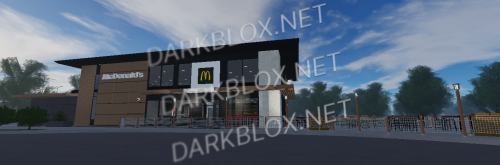
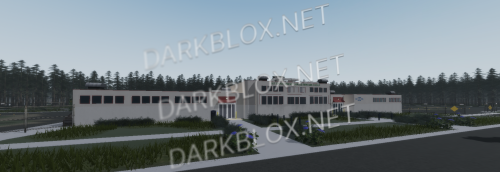
McDonald’s – Liverpool 1.0.0

(1 review)

3 Screenshots

Provided by sansprosii

This product features:

  • A mostly-complete interior & exterior featuring a dining space, a detailed & accurate kitchen, toilets, and management office

  • A custom and functioning ordering system with a customisable menu, neat animations, and ability to send orders to the kitchen – sadly there’s no “claiming” nor “order deletion” functionality yet.

  • 20 accurate and realistic food & drink tools (found in ServerStorage)

  • Pre-installed “Saturn Solutions” door system along with Adonis admin, configured for use by kitchen crew

  • Custom made uniform and cap for crew members
User Feedback

Recommended Comments

ui546

Active Member

Thank you very much for this file

kizzythedog

Active Member

yo bro I live in liverpool and I think I know where this is

kizzythedog

Active Member

I know a mcdonalds that looks like this

Barangi

Active Member

fucking edge lane maccas model

SCP09

Active Member

On 1/18/2025 at 10:29 PM, Foomi said:

fucking edge lane maccas model

no shi bro I think it is hahahahah

Cow

Active Member

7 minutes ago, SCP09 said:

no shi bro I think it is hahahahah

No way they have a roblox model of your McDonalds

SCP09

Active Member

Just now, Cow said:

No way they have a roblox model of your McDonalds

nah bro it 100% is, the only difference is like plants on god

SCP09

Active Member

the chiquitos in the background too, the subway, the b&m and some other place behind the camera, kfc on the left, think theres a starbucks there too and a bit further away is the liverbird statue thing, a next, a smiths, river island, costa, jd and I think a nike, h&m, m&s and a greggsimage.png

Create an account or sign in to comment

Other files from Stage Builder


Powered by darkblox.net

Account

Navigation

Search

Search

Configure browser push notifications

Chrome (Android)
  1. Tap the lock icon next to the address bar.
  2. Tap Permissions → Notifications.
  3. Adjust your preference.
Chrome (Desktop)
  1. Click the padlock icon in the address bar.
  2. Select Site settings.
  3. Find Notifications and adjust your preference.