Skip to content
Do not create multi-accounts, you will be blocked!

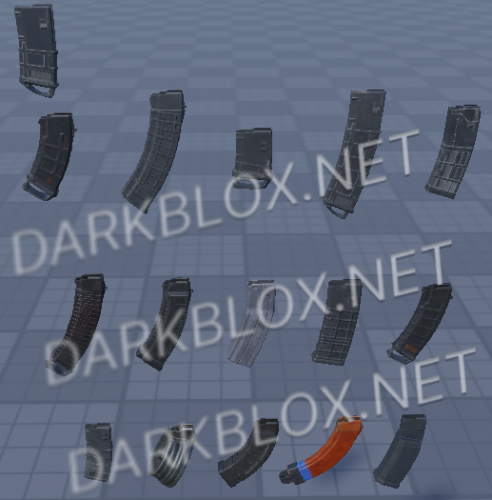
Gun Attachments 1.0.0

(0 reviews)

1 Screenshot

Good Quality Assets. No Credits Also will Start Posting more Stuff Like this.

Make It Rain Money GIF

User Feedback

Recommended Comments

PropertyOfAllah

Active Member

ay ts tuff bratha dont fak you brathar

blyattt

Active Member

asseting ppls stuff won't accomplish literally anything btw go outside n make friends instead of stealing peoples hard work

PropertyOfAllah

Active Member

5 hours ago, blyattt said:

asseting ppls stuff won't accomplish literally anything btw go outside n make friends instead of stealing peoples hard work

ts easy to make btw, only takes a few hours

123ssa31231

Member

On 7/15/2026 at 8:23 AM, blyattt said:

asseting ppls stuff won't accomplish literally anything btw go outside n make friends instead of stealing peoples hard work

bro u know that this is imports right from other games are u fucking stupid?

blyattt

Active Member

if its easy to make get off darkblox and make your own shit lmao. does not change the fact ur stealing assets if its from a different game btw. Also if you cared to actually check what the fuck youre downloading some of them are from 3d stores

On 7/21/2026 at 4:06 AM, blyattt said:

if its easy to make get off darkblox and make your own shit lmao. does not change the fact ur stealing assets if its from a different game btw. Also if you cared to actually check what the fuck youre downloading some of them are from 3d stores

yo stfu no one gives a fuck evb one here cuz they want free assets get yo lame ass киска

flight.png

blyattt

Active Member

yeah of course you don't give a shit because you're selfish wait till you get your shit stolen you'll probably have a shitfit about it fool

Create an account or sign in to comment

Other files from Lejuriz


Powered by darkblox.net

Account

Navigation

Search

Search

Configure browser push notifications

Chrome (Android)
  1. Tap the lock icon next to the address bar.
  2. Tap Permissions → Notifications.
  3. Adjust your preference.
Chrome (Desktop)
  1. Click the padlock icon in the address bar.
  2. Select Site settings.
  3. Find Notifications and adjust your preference.