Skip to content
Do not create multi-accounts, you will be blocked!

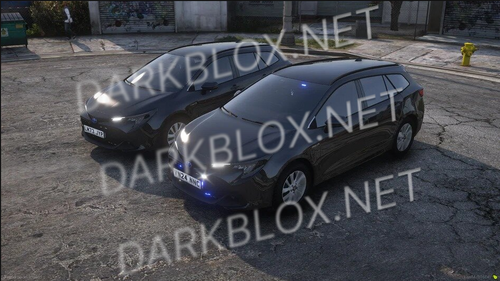
[ZZ] Police '23 Lenco Bearcat G3 1.0.0

(4 reviews)

1 Screenshot

Features:

UV Mapped

Realistic Tune (1.6.7)

Semi-Realistic Sounds (Reverse, Idle, Engine Rev, Startup, Parking brake)

UV Mapped

Animated Opening Doors

Animated Hatch

Animated Foldable Seats

Interior light // Red/White

Dome light // Red/White

Exterior lights (3 Modes)

Working Steering Wheel

Interior lights (Emissives)

ACS Armored

3 Stage ELS

Dual Sirens

Cruise

Alley lights

Lightos

2 Stage Takedown

Custom PA audio 

Sirens are custom imported, in order to hear them studio owner has to grant access through output in Roblox studio

If you press V once it will turn electronics on and if you press it again it will turn engine on.

You may have to be in stage 3 for sirens to work.

User Feedback

You may only provide a review once you have downloaded the file.


The average model, cool!

   1 of 4 members found this review helpful 1 / 4 members

Not as great as I thought it'd be... Overall disappointing

  • The entire thing you can pretty much walk through

  • Quality is mid at best - better on the vehicle - chassis is not too great

   2 of 2 members found this review helpful 2 / 2 members

Probabbly the best bearcat i've ever had. I was looking for it for a longer while now

   2 of 3 members found this review helpful 2 / 3 members

Bearcat drives well but if you get stuck the gear can get stuck until you hop out or turn the engine off to be able to switch to reverse (not at fault of the uploader)

Other files from 123455


Powered by darkblox.net

Account

Navigation

Search

Search

Configure browser push notifications

Chrome (Android)
  1. Tap the lock icon next to the address bar.
  2. Tap Permissions → Notifications.
  3. Adjust your preference.
Chrome (Desktop)
  1. Click the padlock icon in the address bar.
  2. Select Site settings.
  3. Find Notifications and adjust your preference.