Do not create multi-accounts, you will be blocked!
If the site is blocked, use our mirror:
dbx.st
More stable than the .net version. We are moving everything to dbx.st soon. The .net domain will remain as a backup.
Animations
15 files
-
- Free
- 35 Downloads
-
i ripped all of these you too can also get any dev parts by ripping
includes:
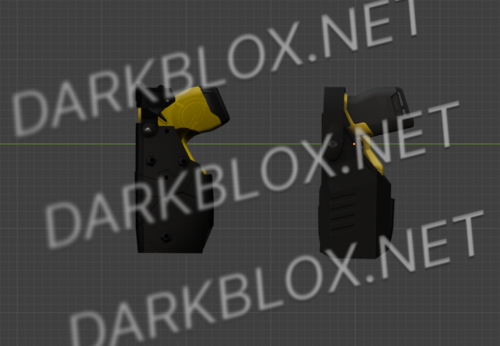
bladetech taser 7 holster (includes green)
bladetech taser 10 holster
blackhawk taser 7 holster (includes green)
bladetech taser 10 holster
safariland taser 7 holster (includes green)
safariland taser 10 holster
standalone taser 7 and 10
left/right hand draw for every holster
diffuse, normal, and spec maps
comes in obj format NOT game ready, none of the eup models in my photos are included
- Free
- 12 Downloads
-
AI Advanced Overhaul is an all-in-one traffic and pedestrian enhancement package for FiveM designed to make Los Santos feel more realistic, dynamic, and immersive. Instead of relying on vanilla GTA V behavior, this resource improves how NPC drivers and pedestrians react to the world around them while remaining highly configurable through a single config.lua.
Whether you're running a serious roleplay server or simply want better AI, every feature can be enabled, disabled, and customized to fit your community.
Features
🚗 AI Speeders
Adds realistic speeding drivers to traffic.
Configurable percentage chance for an NPC to become a speeder.
Adjustable speed multiplier.
Random reroll timer.
NPCs remain calm and continue obeying traffic laws—they simply drive faster than normal.
🐢 Slow AI Traffic Fix
Eliminates the frustrating NPCs that crawl down roads at 20–25 MPH.
Increases driver skill and competency.
Detects traffic moving below your configured minimum speed.
Gently boosts slow drivers back to normal traffic flow.
🚶 Crackhead AI Density
Adds unpredictable pedestrians around the city for a more lived-in environment.
Configurable spawn chance.
Customizable ped model pool.
Maximum nearby pedestrian limit.
Great for urban roleplay immersion.
🚘 AI Overtake
Allows NPCs to intelligently pass slower vehicles.
Detects slower traffic ahead.
Changes lanes when safe.
Returns to normal driving after passing.
Helps reduce unnecessary traffic congestion.
🚓 No Police AI
Completely removes ambient law enforcement from the world.
Prevents police peds from spawning.
Prevents police vehicles from spawning.
Removes existing nearby police.
Disables police scanner and dispatch audio.
Keeps player wanted level locked at 0.
Perfect for roleplay servers that use player-controlled law enforcement.
🚨 AI Yield Master
Improves emergency vehicle interactions.
When a player-driven emergency vehicle has its sirens activated, nearby NPC drivers will:
Pull safely to the side of the road.
Come to a complete stop when necessary.
Yield realistically to allow emergency vehicles through.
🚙 AI Parked Vehicles Gone
Removes abandoned parked vehicles from the map.
Deletes stationary driverless parked vehicles.
Disabled by default.
Can be enabled at any time in the configuration.
Configuration
Every feature can be configured from the included config.lua.
Simply:
Open the AI Advanced Overhaul folder.
Open config.lua using Notepad, Visual Studio Code, or your preferred text editor.
Read the comments provided for each setting.
Change the values to match your server's needs.
Save the file and restart the resource.
No coding experience is required—every option includes simple instructions.
Compatibility
✔ Standalone
✔ FiveM
✔ Framework Independent
✔ Highly Configurable
✔ Performance Friendly
Support
If you encounter any issues, verify your configuration before requesting support. Most settings are explained directly inside config.lua, making customization quick and straightforward.
Enjoy a smarter, more immersive AI experience with AI Advanced Overhaul.
- Free
- 67 Downloads
-
- Free
- 10 Downloads
-
For legal reasons i do not claim ownership of this nor the asseting of this mod.
Installation:
1. Open OpenIV.
2. Navigate to GTA V -> Mods folder -> update -> x64 -> dlcpacks -> patchday4ng -> dlc.rpf -> x64 -> anim -> ingame -> [email protected]
3. Place the files into the folder.
4. Go to menyooStuff.
5. Open FavoriteAnims.xml and copy & paste the animation text from readme.txt
6. Optional mods -> update -> x64 -> dlcpacks -> customanims -> dlc.rpf -> x64 -> anim -> ingame -> clip_mp_.rpf
- Free
- 0 Downloads
-
- Free
- 3 Downloads
-
- Free
- 7 Downloads
-
- Free
- 6 Downloads
-
Larger FOV when aiming with weapons.
Just drop it into the folder: \FiveM\FiveM.app\mods
- Free
- 6 Downloads
-
- Free
- 12 Downloads
-
- Free
- 40 Downloads
-
- Free
- 2 Downloads
-
- Free
- 3 Downloads
-
- Free
- 2 Downloads
-
- Free
- 2 Downloads



Featured Files
-
- 575 Downloads
- 2 Comments
-
- 435 Downloads
- 15 Comments
-
- 3126 Downloads
- 93 Comments
-
- 1127 Downloads
- 1 Comments
-
- 5080 Downloads
- 101 Comments



.thumb.jpg.a237428f121dee15540ca43c17e88147.jpg)


.thumb.webp.aa2e1d8010bcf13356419c4b2a16c392.webp)



File Reviews
-
LT Site B-16 Open Source (OLD AND SAVEINSTANCED)
what is this shit
-
Zombie AI V.3/System
Mid, maybe i did something wrong, but they dont attack or target you, they stand there or just wander randomly. VFX decent, SFX decent, some lag when they get an aura or something but just mid overall
-
MM2, Fully Scripted.
"For legal purposes I do not claim Ownership of this game nor do I the asseting/distribution of this Asset."
Exactly How described: Asseted/Asset -
Florida State Roleplay (UNSCRIPTED, FULL MAP) - ReaperSouth
Good map But See If You Can Get The New Map of Bear C and Get the map of 37 By Idev_crim
-
Casa de Detenção de São Paulo "Carandiru, 1991", By Eros
THE BEST FUCKING asset OF THIS WEBSITE.


.thumb.webp.0553b2343f08ec26d0a982fd64175b05.webp)