


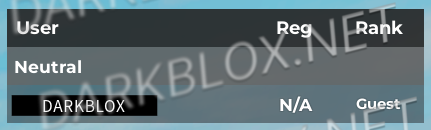
Fully Customizable Settings – Easily adjust appearance, icons, and displayed information.
Shows User is AFK or not
Special Icons for Roles – Displays unique icons for Base Access, Moderator, Developer, and Owner.
Division Rank Display – Shows a player’s division rank for quick recognition.
Device Icons – Indicates which platform a player is using with a PC, Mobile, or Console icon.
Fully Scripted
Do not create multi-accounts, you will be blocked!
Have a special Question? Try to message author!
2 Screenshots
User Feedback
Other files from Angelina
-
- 540 Downloads
- 14.48 kB
-
- 1232 Downloads
- 1 {!#[1:comment][?:comments]}
- 18.03 kB
-
Free
- 507 Downloads
- 7.86 MB
-
Free
- 852 Downloads
- 2 {!#[1:comment][?:comments]}
- 9.91 MB
-
- 2452 Downloads
- 4 {!#[1:comment][?:comments]}
- 131.4 kB
-
Free
- 760 Downloads
- 1 {!#[1:comment][?:comments]}
- 30.1 kB
-
- 242 Downloads
- 14.32 MB
-
- 1275 Downloads
- 4 {!#[1:comment][?:comments]}
- 46.62 MB
-
- 1401 Downloads
- 8.8 MB
-
- 656 Downloads
- 3 {!#[1:comment][?:comments]}
- 24.63 MB
-
- 1779 Downloads
- 2 {!#[1:comment][?:comments]}
- 25.43 kB
-
- 1430 Downloads
- 1 {!#[1:comment][?:comments]}
- 66.09 kB
-
- 41 Downloads
- 7.51 MB

Recommended Comments
Create an account or sign in to comment