Skip to content
Do not create multi-accounts, you will be blocked!

Jailbreak 2024 rescript UPDATES coming 1.3.0

(0 reviews)

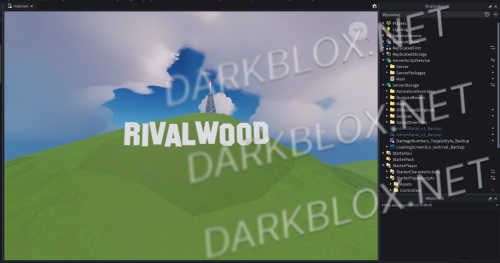
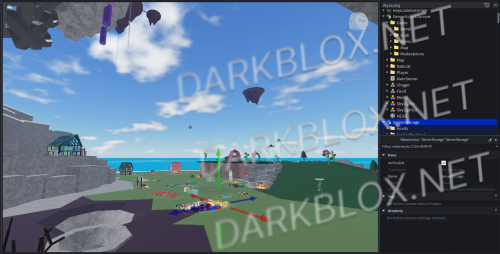
2 Screenshots

Heads up! I did NOT create this game. I only uploaded it to DarkBlox for others to have access to and be able to use the file. All credits belong to the original owners, creators, and developers of the game.

Enjoy and happy developing! 😃


Disclaimers:

  1. I am not responsible for the quality of the game.

  2. I am not responsible for any bugs or missing assets, models, scripts, etc.

  3. I am not required to provide any additional support on how to make the game work. (Though I am always willing to TRY my best to help you with any questions/issues you may have via DarkBlox Messages.)

Before You Play:

For the best chance of the game working, please ensure the following:

  1. You have published the game to Roblox.

  2. You have enabled HTTP Requests.

  3. You have enabled Studio Access to API services.

Additional Notes:

Based on the game, you may also need to do the following to ensure it works properly:

  1. Spoof or replace any missing animations.

  2. Replace any missing/deleted IDs for assets, animations, audios, decals, etc.

  3. Change the character rig type from R15 to R6 or vice versa.

What's New in Version 1.3.0

Released

BIGGEST UPDATE YET: Added Data Saving! everything now saves and optimized some scripts
User Feedback

Recommended Comments

Austin Parks

Trusted Partner

  • Trusted Partner

Hey Alastor,

Respectfully, I don't appreciate you copying and pasting the description I write on my files without giving me any credit.

But overall, amazing file!

Thank you,

Austin Parks

Alastor

Active Member

I'm terribly sorry

i didn't know who to credit since i copied this text from someone who copied yours

true apology from me

Alastor

Active Member

On 7/27/2026 at 11:44 PM, Diddy Parks said:

Hey Alastor,

Respectfully, I don't appreciate you copying and pasting the description I write on my files without giving me any credit.

But overall, amazing file!

Thank you,

Austin Parks

I'm terribly sorry

i didn't know who to credit since i copied this text from someone who copied yours

true apology from me


Alastor

Active Member

I'll credit you imediatley when i'll have the time best regards Alastor

Austin Parks

Trusted Partner

  • Trusted Partner

Thank you Alastor! I appreciate you for giving me credit. :)

Resh1MT2

Active Member

alastor this file is goated please keep it up with the updates, i really wanna see a fully finished version of this soon

Resh1MT2

Active Member

31 minutes ago, Resh1MT2 said:

alastor this file is goated please keep it up with the updates, i really wanna see a fully finished version of this soon

although, i see some stuff still need to be fixed, but i understand the file is still being worked on

i just wanted to ask one thing; why do some services get renamed to a certain string?

Alastor

Active Member

On 7/30/2026 at 6:32 AM, Resh1MT2 said:

although, i see some stuff still need to be fixed, but i understand the file is still being worked on

i just wanted to ask one thing; why do some services get renamed to a certain string?

obfuscasion is needed because of hackers and it is also used in real jailbreak

Alastor

Active Member

On 7/30/2026 at 5:59 AM, Resh1MT2 said:

alastor this file is goated please keep it up with the updates, i really wanna see a fully finished version of this soon

sure will do!!!!

Resh1MT2

Active Member

1 minute ago, bloxsfunforlife said:

why is my screen just blue

85188a41-928a-46d1-8708-82a368c14a85.png

unsure honestly, just make sure you enabled https, api, game is r15, spoofed animations and you should be good

if it doesn't fix, re-download and try again

Alastor

Active Member

change this to your game id

On 7/31/2026 at 9:04 PM, Resh1MT2 said:

unsure honestly, just make sure you enabled https, api, game is r15, spoofed animations and you should be good

if it doesn't fix, re-download and try again

image.pngimage.png

Create an account or sign in to comment

Other files from Alastor


Powered by darkblox.net

Account

Navigation

Search

Search

Configure browser push notifications

Chrome (Android)
  1. Tap the lock icon next to the address bar.
  2. Tap Permissions → Notifications.
  3. Adjust your preference.
Chrome (Desktop)
  1. Click the padlock icon in the address bar.
  2. Select Site settings.
  3. Find Notifications and adjust your preference.