Skip to content
Do not create multi-accounts, you will be blocked!

Napoleonic/Colonial Cavalry Game FREE (NEED SPOOFING) 1.0.0

(1 review)

2 Screenshots

you need to spoof all animations unless it wont work. yea i know you have to spoof ALOT of animations, also you need to remove the overhead name thing

heres a tutorial how to spoof anims

1st: open one of your saves and open a folder (any folder you want)
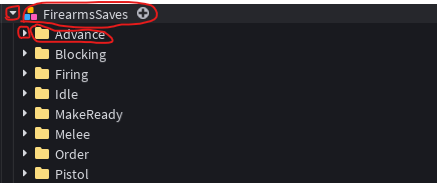
Знімок екрана 2025-10-16 204639.png

2nd: open the folder and pick one of the animations and copy the animation ID (ctrl + c to copy if you dont know)
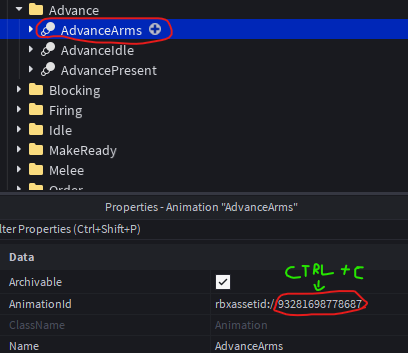
Знімок екрана 2025-10-16 204830.png

3rd: install animation spoofer by this link

https://create.roblox.com/store/asset/2537608092/Animation-Spoofer-V2-Update?keyword=animation+spoofer&pageNumber=1&pagePosition=0

Знімок екрана 2025-10-16 204926.png

4th: once you have that plugin you need to paste the anim into animationid after clicking on the plugin (the stupid images wont upload)

5th: click export

6th: click save

7th: copy the animation id and close that tab

8th: paste the animid in to the animationid property in your animation

Знімок екрана 2025-10-16 204830.png

now repeat this for every animation, also in every animationsave!

User Feedback

Recommended Comments

There are no comments to display.

Create an account or sign in to comment


Powered by darkblox.net

Account

Navigation

Search

Search

Configure browser push notifications

Chrome (Android)
  1. Tap the lock icon next to the address bar.
  2. Tap Permissions → Notifications.
  3. Adjust your preference.
Chrome (Desktop)
  1. Click the padlock icon in the address bar.
  2. Select Site settings.
  3. Find Notifications and adjust your preference.