Registration is limited to Google Gmail & MailRU & Yahoo & Yandex email addresses.
Do not create multi-accounts, you will be blocked!

istoripce10
Active Member
-
Joined
-
Last visited
-
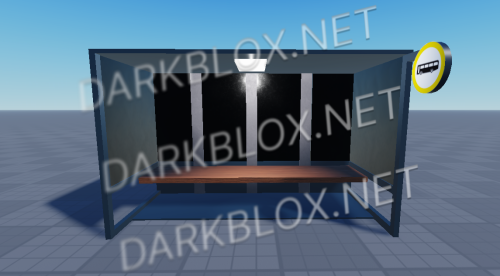 PLEASE READ: This is a bus stop and you can use it in your city etc. You cannot claim the product as your own. You can customize the model. There are 3 seats in the stop 1% Toolbox was used in the product and was only used for the logo There is no virus or error in the product, it is a 100% reliable product.Free
 -
Bus Stop Model PLEASE READ: This is a bus stop and you can use it in your city etc. You cannot claim the product as your own. You can customize the model. There are 3 seats in the stop 1% Toolbox was used in the product and was only used for the logo There is no virus or error in the product, it is a 100% reliable product. File Information Submitter istoripce10 Submitted 03/07/25 Category Models & Mesh View File
-
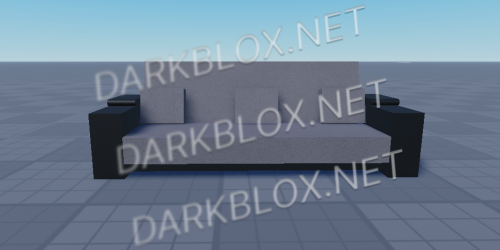 PLEASE READ: The model does not contain any scripts. The model is safe and does not contain any toolboxes. You can customize the model. You cannot claim the model as your own.Free
 -
Armchair (Furniture) PLEASE READ: The model does not contain any scripts. The model is safe and does not contain any toolboxes. You can customize the model. You cannot claim the model as your own. File Information Submitter istoripce10 Submitted 03/04/25 Category Models & Mesh View File
-
 PLEASE READ: Monitor is completely handmade and never contains a toolbox. The model is completely free of viruses and errors. You can never claim the model as your own. You can customize the model. The monitor screen opens and you can change the images. The model contains scripts.Free
 -
Pc Monitor (Working) PLEASE READ: Monitor is completely handmade and never contains a toolbox. The model is completely free of viruses and errors. You can never claim the model as your own. You can customize the model. The monitor screen opens and you can change the images. The model contains scripts. File Information Submitter istoripce10 Submitted 03/04/25 Category Models & Mesh View File